October 24, 2007 spout

Working Remotely for Microsoft: Can I Find Someone To Let Me Work From Home?

Assuming you decide you can and want to work from home for Microsoft, now the trick is finding someone that will take you. The first time, this took me years. As my writing and speaking became more popular, I’d get more regular calls from someone at Microsoft with the perfect job for me.” Each time, I’d ask them if I had to move and when they replied, Of course” as if the entire pool of worthy workers lived in Washington, I’d politely decline. Eventually when the question came up, Sara Williams said, No need to move” and I went to work for MSDN. As is often the case with one’s first Microsoft job, it wasn’t a long-term fit (a software engineer needs to be on a product team!), but finding a product team took me took 6 months of digging. All the groups I talked to wanted me and they all were happy to move me (some even offered to move my extended family up, too, eliminating my main anchor for staying in OR), but culturally they just didn’t know what to do with a remote guy.

Eventually, persistence, and my long experience working remotely, paid off and I actually had two competing offers (and I’m *so* happy about the one I chose). Microsoft has a *ton* of open positions and they get more open about remote employees all the time. Keep at it!

Tomorrow: Can You Communicate Effectively From Home?

October 23, 2007 spout

Working Remotely for Microsoft: Can You Focus On Work At Home?

First off, I don’t recommend remote work for folks who don’t like spending the vast majority of their time away from their colleagues, sometimes having trouble focusing on the work in favor of household duties or interactions. In fact, the ability to focus on work while at home is the #1 issue you’ll have to face as a remote employee and I’ve seen it drive 80% of folks back to the office. I’ve always been naturally in the 20% bucket on that issue.

As an example, when I first started at DevelopMentor, my office was in an open back room separated from the dining room by a hallway kitchen. My two infant boys had me in clear view when I was handcrafting RPC packets for communication with a DCOM server, hanging on the child gate, crying for me to play with them. My wife also had in plain sight when she wanted something from the high shelf. My family often heard me protest, You know, I am actually working over here!” I eventually built a door, purchased Melissa a stool and learned to be very mushy about the split between work and home life. My family’s actually been very supportive and I’ve always preferred the work environment I’ve established at home over any I’ve ever had from an employer, if for no other reason than my home has my family in it.

My advice to anyone that wants to switch to remote work is to try it for a month or two first. Are you able to balance work and family life when you’re at home? Are you able to go for days or weeks without the hallway conversations with your colleagues? Can you communicate effectively in ways that aren’t face-to-face? If you don’t like it, don’t force yourself into it. For example, while DM instructors didn’t seem to have any attrition due to remote work, all of the names I listed above as remote Microsoft employees have either quit, moved to Redmond or complained bitterly during their transition (Scott’s still new : ).

Tomorrow I’ll discuss Can I Find Someone To Let Me Work From Home?”

October 22, 2007 spout

The Whiteboard Whisperer: Working Remotely for Microsoft

I’ve been at Microsoft about 4.5 years, the whole time a remote employee,” i.e. I work mainly from my home in a suburb of Portland, OR but the teams I’ve worked for have all been based at Microsoft HQ in Redmond, WA.

Microsoft is traditionally a company that moves the bulk of their employees to WA, especially for product team and related duties. Of course, we’ve got subsidiaries and sales world-wide, as well as the occasional technology team in talent hot spots around the world, but there is a large corporate bias towards moving new hires to HQ. In fact, so much so that when we’ve got open spots, I’ve learned not to recommend someone that I know won’t move.

And yet, there are notable exceptions. Martin Gudgin worked from England for a number of years. Tim Ewald worked from New Hampshire. Scott Hanselman works from Portland, as did Rory Blythe. Sometimes if there’s enough need and the right role, the distance bias can be overcome. And when it does, I sometimes get an IM, an email, a phone call or a meeting request so that I can answer the question: how do you do it?

Tune in tomorrow for Can You Focus On Work At Home?”

October 19, 2007 spout writing

Fun With GridView*RowPresenter

Fun With GridView*RowPresenter

I was searching for advanced WPF tree samples the other day and ran into the tree-list-view sample:

Notice how the left-most column does the indenting, while the rest of the columns line up nicely. The code for the tree-view-sample is a little C# and a bunch of sophisticated XAML templates I didn’t understand, so I stripped it down to the bare nubbins to discover what was going on. Assume a simple class holding the data:

class Person {
  List<Person> children = new List<Person>();
  public string Name { get; set; }
  public int Age { get; set; }
  public List<Person> Children { get { return children; } }
}

The juicy bit that makes the tree-list view above possible is the GridViewRowPresenter:

<Window ...
  xmlns:local="clr-namespace:WpfApplication10"
  Title="GridView*RowPresenter Fun">

  <Window.DataContext>
    <local:Person Name="John" Age="13" />
  </Window.DataContext>

  <GridViewRowPresenter Content="{Binding}">
    <GridViewRowPresenter.Columns>
      <!-- NOTE: must explicitly create the collection -->
        <GridViewColumnCollection>
          <GridViewColumn Header="Name" DisplayMemberBinding="{Binding Name}" />
          <GridViewColumn Header="Age" DisplayMemberBinding="{Binding Age}" />
      </GridViewColumnCollection>
    </GridViewRowPresenter.Columns>
  </GridViewRowPresenter>

</Window>

Here, we’re creating an instance of the GridViewRowPresenter, which is the thing that the ListView creates for you if you use the GridView. Here, we’re using it explicitly and setting the columns explicitly, binding it to our data and yielding the following:
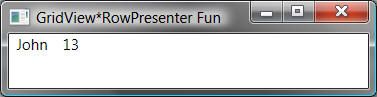
Notice that we’re showing a single item, arranged as a row of values according to our column definition above. It’s boring and not at all interactive, at least because we don’t have a header, which we can get with an instance of the GridViewHeaderRowPresenter:

<Window.Resources>
  <GridViewColumnCollection x:Key="columns">
    <GridViewColumn Header="Name" DisplayMemberBinding="{Binding Name}" />
    <GridViewColumn Header="Age" DisplayMemberBinding="{Binding Age}" />
  </GridViewColumnCollection>
</Window.Resources>

<StackPanel>
  <!-- NOTE: must share access to same column collection to get shared resizing -->
  <GridViewHeaderRowPresenter Columns="{StaticResource columns}" />
  <GridViewRowPresenter Content="{Binding}" Columns="{StaticResource columns}" />
</StackPanel>

Here we’re creating an instance of the row presenter, passing in a reference to the same columns collection used by the row presenter so that the column sizes and positions are shared between the header row and the row presenters:
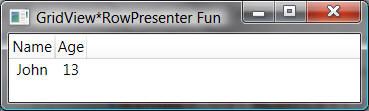
If we want more than one piece of data, all we have to do is use an items control with an item template that in turn creates a row presenter for each item in the collection:

<Window.DataContext>
  <x:Array Type="{x:Type local:Person}">
    <local:Person Name="John" Age="13" />
    <local:Person Name="Tom" Age="12" />
  </x:Array>
</Window.DataContext>

<Window.Resources>
  <GridViewColumnCollection x:Key="columns">
    <GridViewColumn Header="Name" DisplayMemberBinding="{Binding Name}" />
    <GridViewColumn Header="Age" DisplayMemberBinding="{Binding Age}" />
  </GridViewColumnCollection>
</Window.Resources>

<StackPanel>
  <GridViewHeaderRowPresenter Columns="{StaticResource columns}" />
  <ItemsControl ItemsSource="{Binding}">
    <ItemsControl.ItemTemplate>
      <DataTemplate>
        <GridViewRowPresenter Content="{Binding}" Columns="{StaticResource columns}" />
      </DataTemplate>
    </ItemsControl.ItemTemplate>
  </ItemsControl>
</StackPanel>

Now, we’ve got a stack panel that combines the header to the grid view rows with the grid view rows themselves, one per item in our collection:
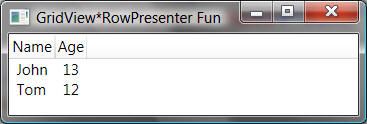
Now on a rush of discovery and simplicity, I took the next step to show hierarchical data, hosting the data in a TreeView control and using a hierarchical data template so that I could build the tree list view shown above with the tiniest bit of XAML and code:

<Window.DataContext>
  <x:Array Type="{x:Type local:Person}">
  <local:Person Name="Chris" Age="38">
    <local:Person.Children>
      <local:Person Name="John" Age="13" />
      <local:Person Name="Tom" Age="12" />
    </local:Person.Children>
  </local:Person>
  <local:Person Name="Melissa" Age="39" />
  </x:Array>
</Window.DataContext>
...
<StackPanel>
  <GridViewHeaderRowPresenter Columns="{StaticResource columns}" />
  <TreeView ItemsSource="{Binding}" BorderThickness="0">
    <TreeView.ItemTemplate>
      <HierarchicalDataTemplate ItemsSource="{Binding Children}">
       <GridViewRowPresenter Content="{Binding}" Columns="{StaticResource columns}" />
      </HierarchicalDataTemplate>
    </TreeView.ItemTemplate>
  </TreeView>
</StackPanel>

Unfortunately, that’s where we run into the limit of what we can do without cranking things up a notch:
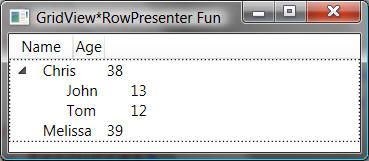
 

Beside the border around the tree view (caused by focus), the worst part about our simple tree-list-view is that, while each grid view row has the proper column sizes and relative positions, because the tree does the indenting, all of the columns are offset, not just the first one. The key to fixing this problem is to put the styling for indenting into the template for the first column only using the CellTemplate property of the GridViewRowColumn, taking over the drawing of the tree view items, which is what the tree-list-view sample does.

October 19, 2007

The Windows Workflow Team Wants to Hear from You!

Are you using WF but it's not quite right? Are you avoiding WF because it doesn't have the features you need? Now's your chance to influence the future of WF with a quick survey. Vote early, vote often! : )
October 3, 2007 fun

Yahtzee Croshaw — You’re My Hero!

First it was the Halo 3 review (which I can’t agree or disagree with yet because I’m still stuck on level one) which a Wii zealot forwarded to me because he likes to send me links to negative portrayals of anything MS-related (like that’s a challenge to find : ), then it was the BioShock review (a game I never figured out the cool part of), then his POV on the console wars (I’m proudly a member of the frat-boy demographic!) and finally it was the Tomb Raider Anniversary review (a game I haven’t played since v1 and preferred the Apple ][+ equivalent) which had me laughing out loud.

Agree with him or not, you gotta appreciate Yahtzee’s style.

October 3, 2007 tools

Releasing the Source Code for the .NET Framework Libraries!

Releasing the Source Code for the .NET Framework Libraries!

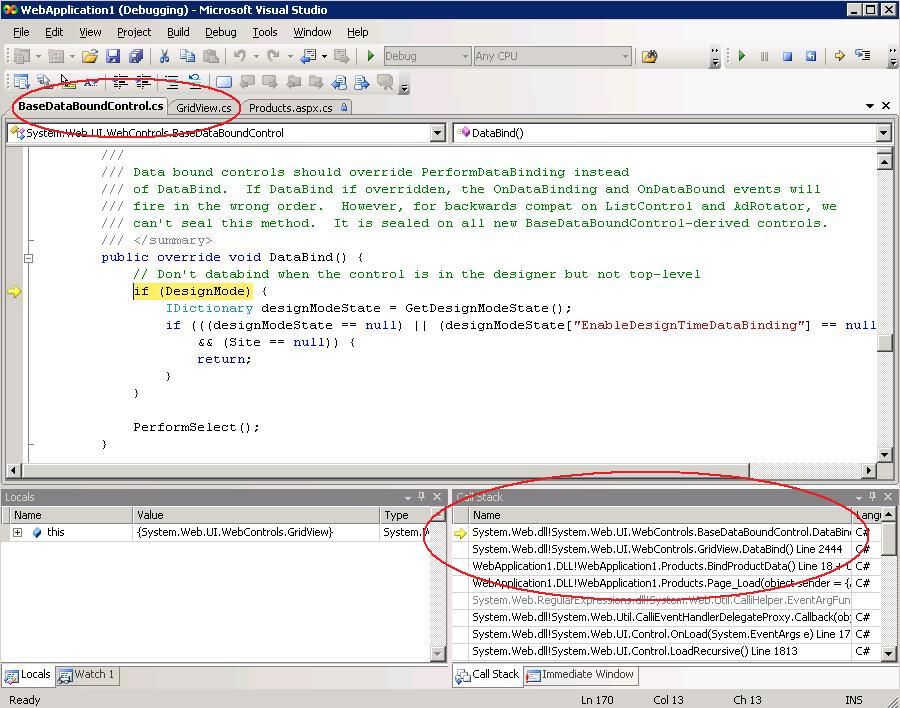
After programming with MFC (a lot!) and writing the ATL book, it was *very* difficult for me to live in a world without the source code to figure out how something was working. All of us have since moved over to Lutz’s most excellent Reflector, but that’s still no substitute for actually stepping in and now ScottGu has announced that we’ll have the ability to browse and debug with the .NET library source code, integrated into VS2008:

Wahoo!

September 9, 2007 fun

I’m an “Uber Cool High Nerd”


← Newer Entries Older Entries →